

创作上传
VIP
收藏下载
登录 | 注册有礼
查看完整案例

收藏

下载

分享

翻译
3D Hospital Architectural Visualization in Blender
I created this 3D hospital project completely in Blender, starting from scratch. First, I modeled the entire building structure, then designed the interiors like the reception area, waiting area, doctor’s room, patient room, and general rooms.
Exterior Design:
I designed a three-story hospital building with a simple and clean look. I kept the front side minimal and professional, adding proper windows and a bold “Hospital” sign so it looks clear and realistic.

Reception & Waiting Area:
For the entrance, I made a reception desk with a computer, chair, and files to show an active working space. Behind it, I placed chairs for the waiting area so patients and visitors can sit comfortably. I also focused on ceiling lights to brighten up the space and make it feel welcoming.

Doctor’s Room:
I designed the doctor’s office with a wooden desk, chair, table lamp, and wall board to make it look like a functional workspace. I kept the setup simple and professional, adding a window for natural light and a small plant for a touch of freshness.

Patient Room:
The patient room is equipped with a hospital bed, heart monitor, IV stand, and other medical equipment. I wanted to create a realistic healthcare setup, so I arranged everything neatly around the bed, just like in a real hospital.

General Room:
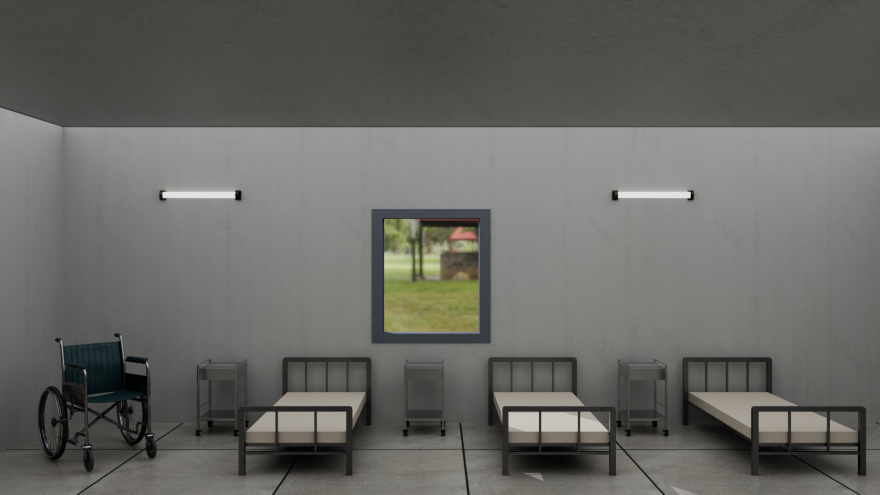
I designed the general ward room with multiple hospital beds arranged in a row, each with side tables and basic medical equipment. I kept enough walking space between the beds so it looks functional and realistic, just like in a real hospital ward. I also added windows for natural light and ceiling lights to make the environment bright and clean.
Corridor 1st Floor:
On the first floor, I designed a corridor with a sitting area where I placed benches and a wheelchair to make it look realistic. This space connects to different hospital rooms like the doctor’s room, patient room, and general ward. I kept the walls and lighting simple to give a clean hospital feel.

Corridor 2nd Floor:
On the second floor, the corridor leads to the toilet section. I added properly labeled doors for easy identification and kept the design minimal with clean textures. The ceiling lights brighten the space, and I arranged the corridor in a way that feels functional, just like in a real hospital setup.

Stairs Area:
I also modeled the staircase area to connect the ground floor with the upper floors. I kept the stairs simple with clean geometry and proper railing for safety. I added wall lights to brighten the way and made sure the stairs look functional and realistic, just like in an actual hospital building.

Lighting & Rendering:I set up both indoor lights and natural lighting from windows to balance the look. For the final renders, I made sure the textures and lighting work together to give a clean and realistic output.
👉 This project helped me practice handling a large 3D environment while also focusing on small details like props, materials, and lighting setup. I kept the design simple but realistic so it can work for architectural visualization or game environment concepts.
南京喵熊网络科技有限公司 苏ICP备18050492号-4知末 © 2018—2020 . All photos and trademark graphics are copyrighted by their owners.增值电信业务经营许可证(ICP)苏B2-20201444 苏公网安备 32011302321234号
苏公网安备 32011302321234号客服
消息
收藏
下载
最近